
kumiko connectors: connect ads, analytics, SEO and CRM
By the end of this page, you know which credentials each of the 25 kumiko connectors needs, how to connect a source for a client and what to check when a sync looks wrong. Connectors are for admins and delivery leads. Plan an afternoon the first time, because some platforms need approval before they work.
Before you start
- kumiko is installed and the licence is active. If not, start with the installation guide.
- The client exists in kumiko. If not, see the clients page.
- You can sign in to each platform with an account that may read the client’s data.
How connectors work
Every connector reads data. None of them changes anything in the platform. kumiko does not change bids, budgets or campaigns in your clients’ ad accounts.
- Daily sync. Each connection syncs every day at a set hour. Every sync re-reads the last 30 days, so late conversions are counted and a missed day is caught up.
- Encrypted access. OAuth tokens and API keys are stored encrypted.
- Health checks. Every sync records how many rows it read and compares that with the usual volume. A sync that fails, or that returns far less than usual, notifies the admins.
- One channel list. All connectors write into one list of channels. “LinkedIn Ads” therefore means the same thing in the ad platform, in analytics and in the CRM, and you can compare them in one report.
- Values read at a moment. Followers, the visibility index, backlinks and platform ratings show the latest value of the period, never a sum over days. A sum of followers would be meaningless.
Register the OAuth apps first
Many platforms let kumiko read data only through an app that you register once per installation. An OAuth app is the developer app you create with the platform, so that a client can sign in and allow kumiko to read their data. You register it once for your whole installation, not once per client.
Every OAuth app uses the same redirect address:
<your kumiko address>/oauth/callbackReplace the placeholder with the address you chose during installation, for example https://reports.your-agency.com/oauth/callback. Enter the app’s ID and secret in the server settings under the names listed below, then restart kumiko.
This table shows what you set up for each connector:
| Connector | What you set up |
|---|---|
| Google Ads | A Google OAuth app (GOOGLE_OAUTH_CLIENT_ID, GOOGLE_OAUTH_CLIENT_SECRET) and a Google Ads developer token (GOOGLE_ADS_DEVELOPER_TOKEN, Basic access or higher) |
| Google Analytics 4, Search Console, Business Profile, YouTube, BigQuery | The same Google OAuth app, with the matching APIs enabled. BigQuery can also use a service account key. |
| Microsoft Advertising | A Microsoft OAuth app (Entra app registration) and a developer token |
| LinkedIn Ads | A LinkedIn app with the Advertising API product |
| LinkedIn company page | A second LinkedIn app with the Community Management API (LINKEDIN_PAGES_OAUTH_CLIENT_ID and its secret) |
| Meta Ads, Facebook page, Instagram | A Meta app (META_APP_ID, META_APP_SECRET) with the permissions for ads and pages |
| HubSpot | A HubSpot public app, or a private app token per client |
| Salesforce | A Salesforce connected app with the api and refresh_token scopes |
| Trustpilot | TRUSTPILOT_API_KEY to read reviews. With TRUSTPILOT_API_SECRET added, a business user signs in once so replies can be published. |
| ChatGPT Ads, Pipedrive, SISTRIX, Semrush, Ahrefs, Matomo, Piwik PRO, Bing Webmaster Tools | A key or token per client, entered in the connect form |
| AI search visibility | At least one AI model, see the insights and AI page |
| Google Sheets or CSV | Nothing |
Platform approvals
Note: some connectors need approval from the platform before they work. Apply early, because the platform decides how long this takes.
- Google Ads: the developer token (Basic access or higher).
- Google Business Profile: access to the Business Profile API.
- LinkedIn company page: the Community Management API.
The connectors are built against the platforms’ published APIs and have been tested with recorded responses. They have not yet been checked live against every platform, and kōdōkalabs holds no partner status or certification with any of these platforms.
Connect a source
Open Connectors in the sidebar. The page lists every connection of every client with its status, last sync and health, and holds the form to connect a new source.
-
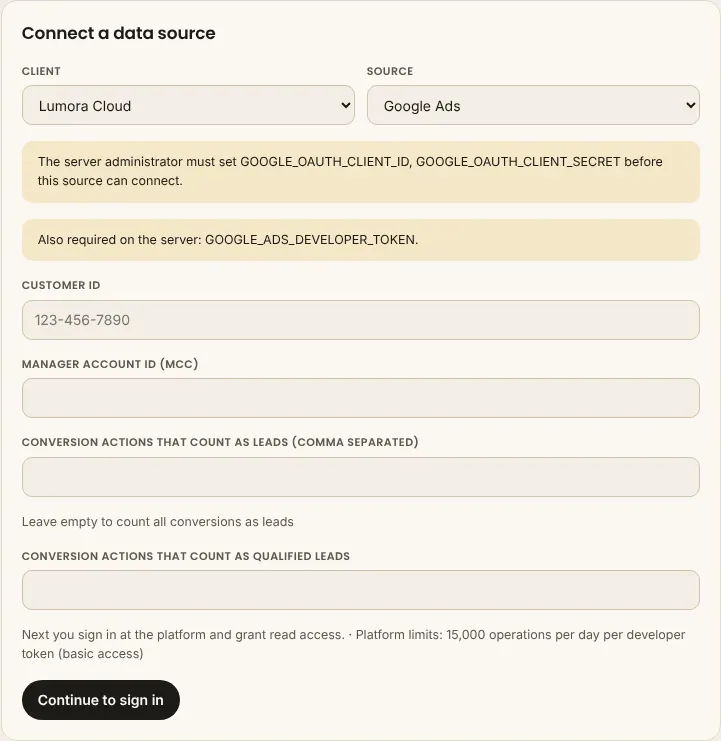
Pick the client and the source. The form changes with the source. A yellow note tells you if the server administrator still has to set an app ID, a secret or a developer token. The form for Google Ads, for example, asks for the customer ID, the manager account ID (MCC) and the conversion actions that count as leads.
-
Fill the fields, or sign in with the platform. Press Continue to sign in. You sign in at the platform and grant read access. For sources that use a key or token, you paste it into the form.
-
Pick the account. If the login has access to several accounts, choose the one that belongs to this client.
-
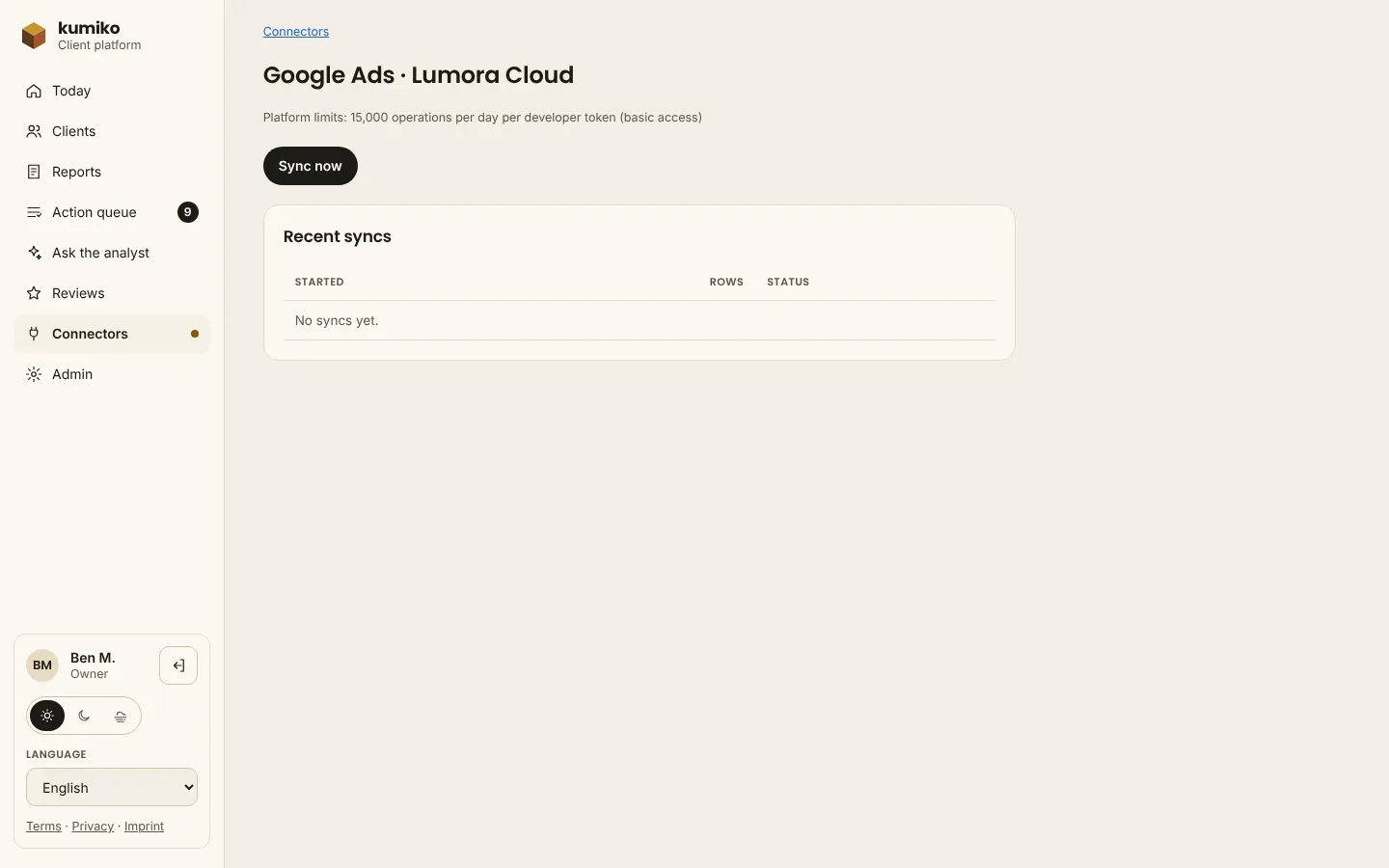
Run the first sync. Open the connection and press Sync now.
-
Check the sync runs. The connection page lists recent syncs with the number of rows and the status.
Leads and qualified leads
kumiko counts leads and qualified leads in two ways, depending on where the number comes from. Set both correctly, or you count a lead twice.
- Ad platforms count the conversions you name. In the connect form, you list the conversion actions that count as leads, and separately the ones that count as qualified leads. If you leave the lead field empty, kumiko counts all conversions as leads.
- CRMs count leads and qualified leads by status.
A form submission that your ad platform counts as a lead and that your CRM later marks as qualified is one person in two places. Name only the conversion actions that mean a lead, and let the CRM carry the qualified leads, so each person is counted once per source.
Paid media
Google Ads
Brings in spend, impressions, clicks and conversions. You need the Google OAuth app and a Google Ads developer token with Basic access or higher, which Google must approve. In the connect form, enter the customer ID and, if you work through a manager account, the manager account ID (MCC). Then name the conversion actions that count as leads and as qualified leads. Limit: Basic access allows 15,000 operations per day per developer token.
Microsoft Advertising
Brings in the same paid media figures for Microsoft’s ad network. You need a Microsoft OAuth app (an Entra app registration) and a Microsoft developer token.
LinkedIn Ads
Brings in paid media figures for LinkedIn campaigns. You need a LinkedIn app with the Advertising API product.
Meta Ads
Brings in paid media figures for Meta campaigns. You need a Meta app with the permissions for ads and pages, set through META_APP_ID and META_APP_SECRET. The same app serves the Facebook page and Instagram connectors.
ChatGPT Ads
Brings in paid media figures for ChatGPT Ads, so the paid side of AI answers sits in the same report as your other channels. You need a key or token per client, which you enter in the connect form.
Web analytics
Google Analytics 4
Brings in sessions and conversions from GA4. It uses the same Google OAuth app as Google Ads, with the Analytics API enabled.
Matomo
Brings in web analytics for clients who do not use Google Analytics. You need a key or token per client, entered in the connect form. Matomo suits clients who host their own analytics.
Piwik PRO
Brings in web analytics from Piwik PRO, another option for clients who avoid Google Analytics. You need a key or token per client, entered in the connect form.
Search and SEO
Google Search Console
Brings in search performance for the client’s sites. It uses the same Google OAuth app, with the Search Console API enabled.
Bing Webmaster Tools
Brings in search performance from Bing. You need a key or token per client, entered in the connect form.
SISTRIX
Brings in the visibility index, which kumiko shows as the latest value of the period, not as a sum. You need a key or token per client.
Semrush
Brings in SEO data such as ranking keywords and estimated organic traffic next to Search Console. You need a key or token per client.
Ahrefs
Brings in backlinks, referring domains and domain rating. These are latest values, not sums. You need a key or token per client.
AI search visibility
Brings in the share of AI answers and the AI mention rate: how often AI assistants mention the client’s brand and cite its domains when buyers ask a question. You set the questions, the brand terms and the domains in the client’s settings, as described on the clients page. kumiko checks the answers every week. This connector needs at least one AI model, because kumiko asks the model the questions.
Organic social
LinkedIn company page
Brings in followers, engagements and engagement rate for the company page. This is a separate connection from LinkedIn Ads: it needs a second LinkedIn app with the Community Management API, which LinkedIn must approve, set through LINKEDIN_PAGES_OAUTH_CLIENT_ID and its secret.
YouTube
Brings in video views and followers for the client’s channel. It uses the same Google OAuth app, with the matching API enabled.
Brings in followers, engagements and engagement rate for the client’s account. It uses the Meta app.
Facebook page
Brings in followers and engagements for the client’s page. It uses the Meta app. Note: Facebook retired some page metrics. If a metric is empty, check the sync notes on the connection page before you assume the connection is broken.
CRM
HubSpot
Brings in pipeline, opportunities and won revenue, and counts leads and qualified leads by status. You register a HubSpot public app, or you use a private app token per client.
Salesforce
Brings in the same CRM figures from Salesforce. You register a Salesforce connected app with the api and refresh_token scopes.
Pipedrive
Brings in pipeline, opportunities and won revenue from Pipedrive. You need a key or token per client, entered in the connect form.
Reviews and local
Google Business Profile
Brings in reviews and ratings for the client’s locations. It uses the same Google OAuth app, with the Business Profile API enabled, and Google must approve your access to that API. With the reviews module, an approved reply is published on the platform from kumiko, as described on the reviews page.
Trustpilot
Brings in reviews. You need TRUSTPILOT_API_KEY to read them. To publish replies from kumiko, you also set TRUSTPILOT_API_SECRET, and a business user signs in once.
Files and warehouse
Google Sheets or CSV
Brings in numbers that no connector covers, for example offline results. It needs no app and no approval.
BigQuery
Brings in any figures the client already keeps in a data warehouse. The client prepares a table or view. You tell kumiko which columns hold the date and which hold the metrics.
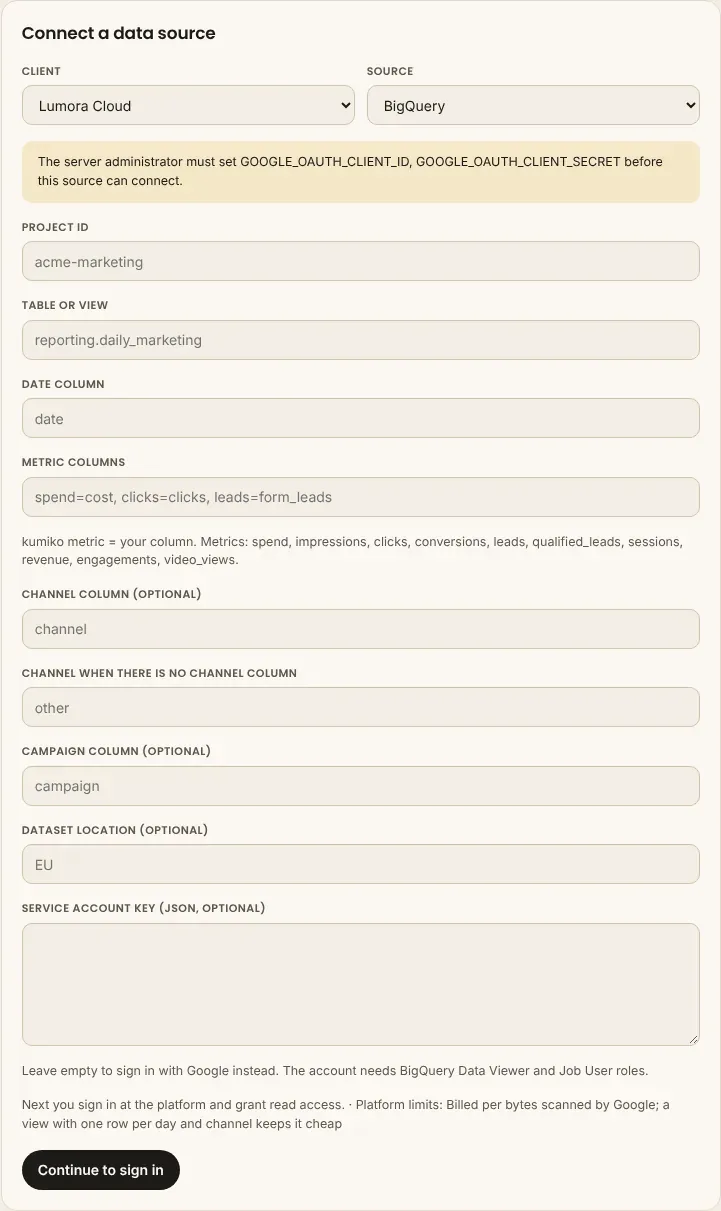
In Metric columns, you map kumiko metrics to your own column names, for example:
spend=cost, clicks=clicks, leads=form_leadsThe left side is the kumiko metric and the right side is your column. The metrics you can map are spend, impressions, clicks, conversions, leads, qualified_leads, sessions, revenue, engagements and video_views. Optional fields name a channel column, a channel to use when there is none, a campaign column and the dataset location.
kumiko builds the query itself from the column names you map. It never runs SQL that someone types. You can sign in with Google, or paste a service account key. The account needs the BigQuery Data Viewer and Job User roles. Google bills BigQuery by the bytes scanned, so a view with one row per day and channel keeps the cost low.
Troubleshooting
Access expired
If a connection stops syncing because the platform has withdrawn access, the admins are notified. Open the connection and sign in again.
Fewer rows than usual
kumiko compares every sync with the usual volume. If it reads fewer rows, check that the connection points at the right account and that the conversion action names match the names in the platform exactly.
A metric is empty
A platform may retire a metric, as Facebook did for some page metrics. Check the sync notes on the connection page first.
The platform has not approved your access yet
If Google Ads, Google Business Profile or the LinkedIn company page does not connect, the developer token or API access may still be waiting for approval. Wait for the platform’s decision, then try again.
The form says the server is missing something
The yellow note on the form lists what the server still needs. Set the missing app ID, secret or token on the server, restart kumiko and try again.
FAQ
How often does kumiko sync?
Every connection syncs once a day at a set hour. Each sync re-reads the last 30 days, so late conversions are counted.
Can kumiko change my clients’ ad campaigns?
No. kumiko reads data. It does not change bids, budgets or campaigns in the ad platforms.
Do I need an OAuth app for every client?
No. You register each OAuth app once per installation. Each client then signs in through it.
Where are the tokens stored?
On your server, encrypted. They cannot be decrypted without KUMIKO_SECRET, so never change it after setup.
Can I use a client’s data warehouse?
Yes, through BigQuery. The client prepares a table or view, and you map its columns to kumiko metrics.