Menu Close

kōdōkalabs
Build an AI Marketing System with Governed Workflows

Build: Implement a Governed AI Marketing System

Build is the third phase of The kōdōkalabs Transformation System. It implements the approved operating model as tested workflows, knowledge infrastructure, integrations, governance controls, measurement, documentation, and human review mechanisms.

Executive Summary

Build is where architecture becomes something that actually runs — and where a specific gap tends to open between demonstration and operation. A workflow can work perfectly in a demo and still fail in normal use because the source knowledge behind it is incomplete, exceptions aren’t handled, approvals are informal, measurement is missing, or ownership never leaves the person who built it. This page covers the eight components that make up a complete Build package, the three release states a workflow moves through on its way to production, what testing an AI-assisted workflow actually requires, and the documentation Build must produce before handover to Enable.

Key Takeaways

  • A working AI marketing system is more than an automation that produces output — it needs approved knowledge, defined responsibility, observable controls, and a named human owner.
  • Workflows move through three deliberate release states: sandbox validation, controlled pilot, and production-ready.
  • Testing an AI-assisted workflow covers functional, factual, quality, brand, and risk dimensions — not just “does it run.”
  • Models and tools are replaceable components inside an approved architecture, not the operating system itself.
  • Build hands Enable a specific, documented, testable system — not a working demo with undocumented gaps.

What Is the Build Phase?

Build takes the workflow specifications, knowledge map, integration blueprint, and governance matrix Architect produced and turns them into something that actually runs — tested, governed, measured, and documented well enough that Enable can transfer real ownership of it to the client team. Build isn’t where new design decisions get made; it’s where approved design gets implemented, with the discipline that implementation requires.

What Build Is Not

Build is not connecting a set of tools and calling the result a system. It’s not deploying a single AI agent and treating that as evidence the operating model is built. A workflow that produces convincing output in a demonstration but hasn’t been tested against real exceptions, hasn’t had its knowledge sources verified, and has no defined human owner isn’t built — it’s a prototype, and prototypes are a legitimate part of Build’s sandbox stage, not its end state.

Inputs Required from Architect

Build starts from Architect’s complete deliverable set: the target operating model, workflow specifications, responsibility matrix, knowledge map, integration blueprint, governance matrix, measurement plan, prioritized backlog, pilot definition, documentation plan, and capability-transfer plan. If a workflow specification is missing a required field — exceptions or approvals are the two most commonly incomplete — Build’s first move should be returning to Architect for that specific gap, not improvising a decision that was supposed to have already been made.

The Eight Components of the Build Package
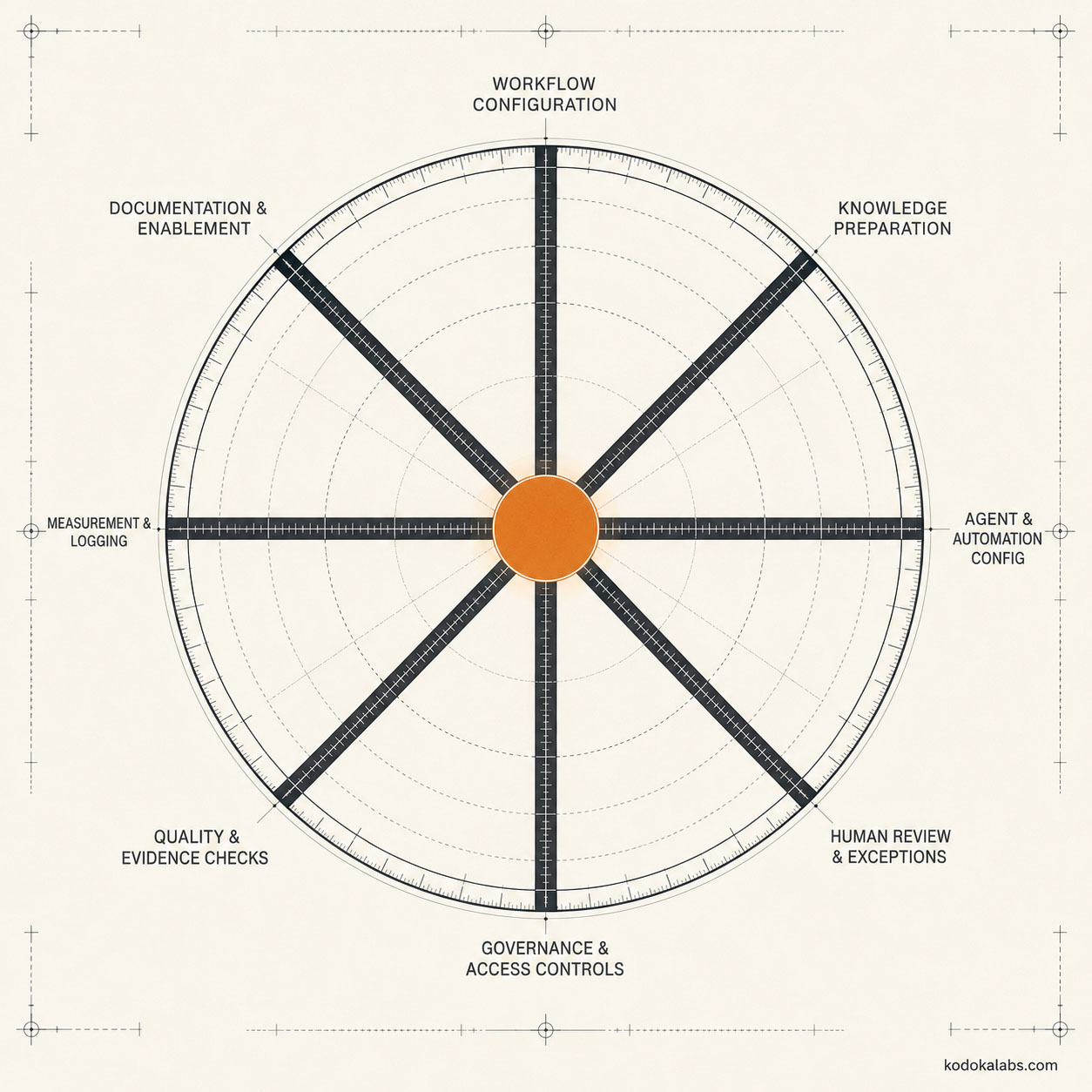
kōdōkalabs - Framework - Build Phase - The Build Phase consists of 8 separate components

kōdōkalabs’ Build Package defines eight implementation components required for every workflow moving through Build.

Workflow configuration

Implementing the actual sequence of steps, triggers, and system connections the workflow specification defined — configured to match the spec, not a convenient approximation of it.

Knowledge and context preparation

Preparing the structured knowledge base the workflow will draw on: verifying source quality, resolving access permissions, and structuring content so it’s actually retrievable by the AI systems that need it.

Agent, automation, and integration configuration

Configuring the specific tools, models, and integrations the architecture specified — treating them as implementation choices within an approved design, not as the design itself.

Human review and exception handling

Building the actual review checkpoints and exception paths the workflow specification defined, not leaving them as a documented intention nobody implemented.

Governance, access, privacy, and security controls

Implementing the risk classification and review requirements Architect’s governance matrix specified, including access controls over who and what can reach sensitive data or systems.

Quality and evidence checks

Building the mechanisms that verify output quality and factual accuracy before a workflow’s output reaches its intended use — not relying on spot-checking after the fact.

Measurement and logging

Instrumenting the workflow to capture the metrics Architect’s measurement plan specified, from the moment the workflow goes live, not added retroactively once someone asks how it’s performing.

Documentation and enablement materials

Producing the operating documentation the Enable phase will need — this component is what makes ownership transfer possible rather than aspirational.

How a Workflow Moves from Sandbox to Production
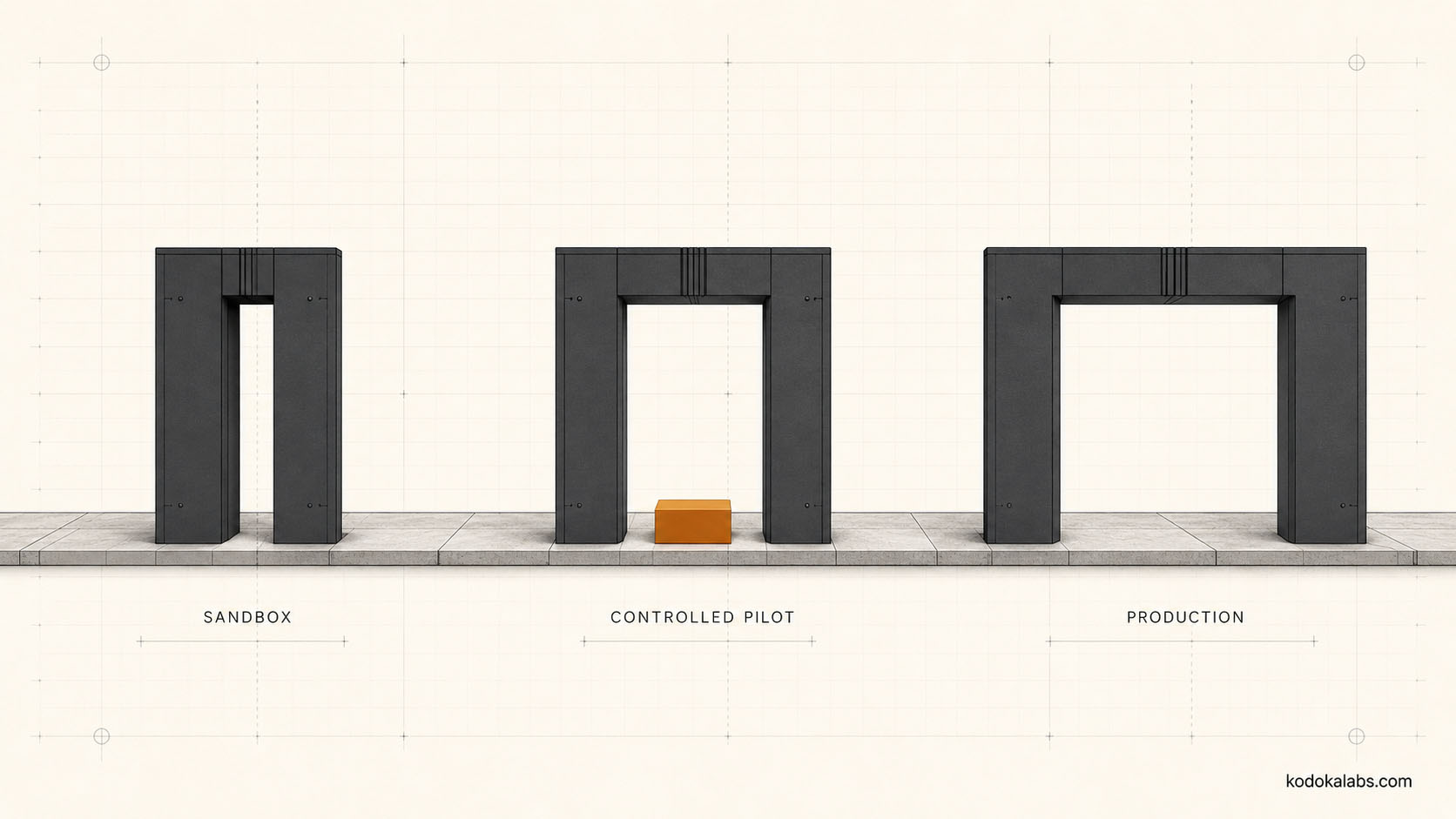
kōdōkalabs - Framework - Build Phase - Sandbox-to-pilot-to-production release path

kōdōkalabs’ Pilot Readiness Levels define three environments a workflow moves through, each with different permitted data, audience exposure, human approval, monitoring, and rollback requirements.

Level Permitted Data Audience Exposure Human Approval Rollback
Sandbox validation Synthetic or non-sensitive test data None — internal only Full review of every output Immediate, no production impact
Controlled pilot Real data within approved scope Limited, defined audience Review at defined checkpoints Documented rollback plan required
Production-ready Full approved data scope Full intended audience Review scaled to risk classification Tested rollback procedure

A workflow doesn’t skip levels because it performed well at an earlier one — controlled pilot testing surfaces failure modes sandbox testing with synthetic data structurally cannot, because real data and real exceptions don’t fully resemble a test set designed in advance.

Moving between levels is a deliberate decision with its own evidence requirement, not an automatic progression once a certain amount of time has passed. A workflow graduates from sandbox to controlled pilot when its functional and factual testing pass at the sandbox level; it graduates from controlled pilot to production-ready when the pilot has run long enough, across enough real cases, to produce evidence about how it performs against actual exceptions — not just the cases anticipated in advance. Rushing this progression to meet a deadline is one of the more common ways a workflow reaches production before it’s actually ready.

Human Review and Exception Handling

Every workflow’s specification defines where human review occurs and what triggers escalation to a human for an exception the automated path can’t handle correctly. Build implements both as functioning checkpoints, not documentation — a review step that exists on paper but has no actual gate preventing output from proceeding without it isn’t a control, it’s an aspiration. Exception handling in particular tends to be underbuilt relative to its actual importance, because exceptions are less interesting to design than the primary workflow path and easy to defer under time pressure. A workflow’s exception rate — how often real-world input falls outside what the primary path was designed to handle — is itself useful evidence: a workflow with a persistently high exception rate may indicate the underlying process wasn’t as standardized as Architect’s design assumed, which is a finding worth feeding back rather than just routing around indefinitely.

Knowledge Preparation and Source Control

The knowledge base a workflow draws on gets prepared deliberately during Build: sources are verified for quality and currency, access permissions are resolved, and content is structured so retrieval actually works reliably. A workflow with excellent automation logic sitting on top of an unverified or poorly structured knowledge base will still produce unreliable output — the automation layer can’t compensate for weak knowledge underneath it.

Agent and Automation Implementation

Models, tools, and specific vendor platforms are implementation choices within the approved architecture — replaceable components, not the operating system itself. This page doesn’t recommend or evaluate specific current tools or model capabilities, since tool-specific claims require verification against current vendor documentation at the time of implementation, not a general assertion here that could go stale. What matters architecturally is that whatever specific tools are chosen fit the responsibility allocation, governance requirements, and knowledge access controls Architect already specified — not which particular vendor happens to be selected.

This distinction has a practical consequence worth naming directly: an organization shouldn’t need to rebuild its entire operating model every time the underlying model or tool landscape changes, which it does with some regularity. A well-built system treats the specific model or automation platform as a configuration detail sitting inside a stable architecture, so that a model change or tool migration is a Build-level implementation task, not an Architect-level redesign.

Testing AI-Assisted Marketing Workflows

Testing an AI-assisted workflow covers more ground than testing whether it runs without crashing. Relevant categories, applied based on the workflow’s risk classification, include: functional testing (does it execute the specified steps correctly), factual testing (is the output accurate and traceable to approved sources), quality testing (does it meet the defined standard for its use), brand testing (does it match required voice and positioning), bias testing (does it produce unfair or skewed output across relevant scenarios), privacy and security testing (does it handle sensitive data appropriately), failure testing (what happens when an input or dependency fails), load testing (does it perform at expected volume), and rollback testing (can a bad deployment actually be reversed cleanly). Not every workflow requires every category at full depth — the workflow’s risk classification from Architect’s governance matrix determines which categories matter most.

Factual testing deserves particular attention for AI-assisted marketing workflows specifically, because generative AI output can be fluent and confident while being wrong in ways that aren’t obvious on a quick read. Factual testing means checking specific claims against their stated sources, not just checking that the output reads plausibly — plausibility and accuracy are different properties, and testing for one doesn’t validate the other. A workflow that passes every functional and quality test while regularly producing confidently-stated factual errors hasn’t actually passed Build’s bar, even though it may look finished.

Measurement and Observability

A workflow ships with the instrumentation Architect’s measurement plan specified already built in, capturing data from first production use rather than being retrofitted once someone asks a question the workflow was never designed to answer. Observability extends beyond the primary performance metric to include the operational signals — error rates, exception frequency, review turnaround — that indicate whether the workflow is actually healthy day to day.

Documentation Required Before Handover

Before a workflow moves toward Enable, Build produces documentation covering how the workflow operates, what its knowledge sources are and how they’re maintained, what its governance controls require, how to interpret its measurement output, and what to do when it fails. This documentation is what makes ownership transfer to the client team possible — a workflow that runs well but exists only in the builder’s head hasn’t actually been built to kōdōkalabs’ standard, regardless of how well it currently performs.

Build Outputs and Acceptance Criteria

Build’s Acceptance Record requires evidence across functionality, output quality, source traceability, risk controls, accessibility where relevant, security and privacy review, measurement, documentation, ownership, and rollback. A workflow doesn’t move to Enable until each of these has documented evidence, not just an informal sense that it seems to be working.

Common Build Failure Modes

  • Treating a demo as done – mistaking a workflow that performs well on a curated demonstration for a workflow that’s actually ready for controlled-pilot or production use. Demonstrations are, almost by definition, run against inputs chosen because they work well — this is precisely why the Pilot Readiness Levels require passing through real-data conditions before production, not just a successful showcase.
  • Skipping sandbox validation – moving straight to a controlled pilot with real data before basic functional and factual issues have been caught in a lower-risk environment. Skipping this step trades a cheap, contained failure for a more expensive, more visible one later.
  • Undocumented knowledge sources – a workflow drawing on knowledge nobody can trace back to an approved source, making factual errors difficult to diagnose or fix. When something goes wrong in production, the first useful question is “what source did this come from” — a workflow that can’t answer that question is far harder to debug and far riskier to trust.
  • Review steps without teeth – a human review checkpoint that exists in documentation but has no actual mechanism preventing output from bypassing it. A review step that a busy team can quietly skip under deadline pressure isn’t a control — it’s a suggestion, and it will get skipped exactly when the risk of skipping it is highest.
  • Retrofitted measurement – adding instrumentation only after a workflow is already live and someone asks how it’s performing. By the time that question gets asked, the workflow has usually already been running long enough that the earliest, most informative performance data is permanently unavailable.
  • No rollback plan – discovering during an actual failure that nobody defined how to revert the workflow to its prior state. A rollback plan that’s never been tested is not meaningfully different from having no rollback plan at all.
  • Ownership left with the builder – a workflow that only the person who built it actually understands, undermining the ownership transfer Enable depends on. This is the single most common reason organizations remain dependent on an external implementer indefinitely, even after the workflow itself is technically working well.

From Build to Enable

Build hands Enable a tested, documented, production-ready (or deliberately scoped controlled-pilot) workflow with its Acceptance Record complete. Enable’s job is building the client team’s capability to operate what Build produced — it depends on Build having actually finished, not on Enable filling gaps Build left open. This handoff discipline matters because Enable and Build are frequently compressed together under time pressure, with training beginning on a workflow that’s still technically in progress. That compression tends to produce a training experience built around a moving target — the client team learns to operate a version of the workflow that changes underneath them before they’ve fully internalized it, which undermines exactly the ownership transfer Enable exists to accomplish.

Frequently Asked Questions - Build Phase - (FAQ)

What does it take to build an AI marketing system safely and usefully?

All eight Build Package components implemented and tested — workflow configuration, knowledge preparation, agent/automation configuration, human review and exception handling, governance controls, quality checks, measurement and logging, and documentation — not just a single automation deployed and left unmonitored.

How is a system different from a single automation?

A system has defined responsibility, observable controls, documented exceptions, measurable performance, and an identified human owner. A single automation might produce useful output without any of these — which is exactly the gap that causes automations to work in demos and fail in production.

What are the three release states a workflow moves through?

Sandbox validation (synthetic or non-sensitive test data, full review, no production impact), controlled pilot (real data within approved scope, checkpoint review, documented rollback), and production-ready (full data scope, risk-scaled review, tested rollback).

What kinds of testing does an AI-assisted workflow need?

Depending on risk classification: functional, factual, quality, brand, bias, privacy/security, failure, load, and rollback testing — see "Testing AI-Assisted Marketing Workflows" above.

Does Build recommend specific AI tools or models?

No — tool and model choices are implementation decisions within the approved architecture, and specific vendor capabilities need verification against current documentation at implementation time rather than a general claim made here.

What documentation does Build need to produce?

Coverage of how the workflow operates, its knowledge sources and maintenance, governance controls, measurement interpretation, and failure response — the documentation set that makes Enable's ownership transfer possible.

What happens if a workflow fails a Build acceptance check?

It doesn't proceed to Enable until the gap is resolved and re-tested — the Acceptance Record exists specifically to prevent an incomplete workflow from being handed off as if it were finished.

Ready to
Build a Governed AI Marketing System?

If you’re tired of fragmented, keyword-centric strategies, it’s time to build a foundation that withstands algorithm shifts. Let’s start with the blueprint that guarantees high-ROI execution.