
AI Marketing Workflow Design: A Practical Framework
AI Marketing Workflow Design: From Isolated Tasks to Governed Systems
Executive Summary
Key Takeaways:
- Workflow design should precede tool selection – choosing a tool before the workflow is defined tends to optimize one step while creating problems elsewhere.
- A task, a process, a workflow, and an operating system are four distinct levels of scope, and confusing them leads to under- or over-engineered solutions.
- The Workflow Architecture Canvas specifies twelve fields, from business outcome through measurement, before a workflow is considered designed.
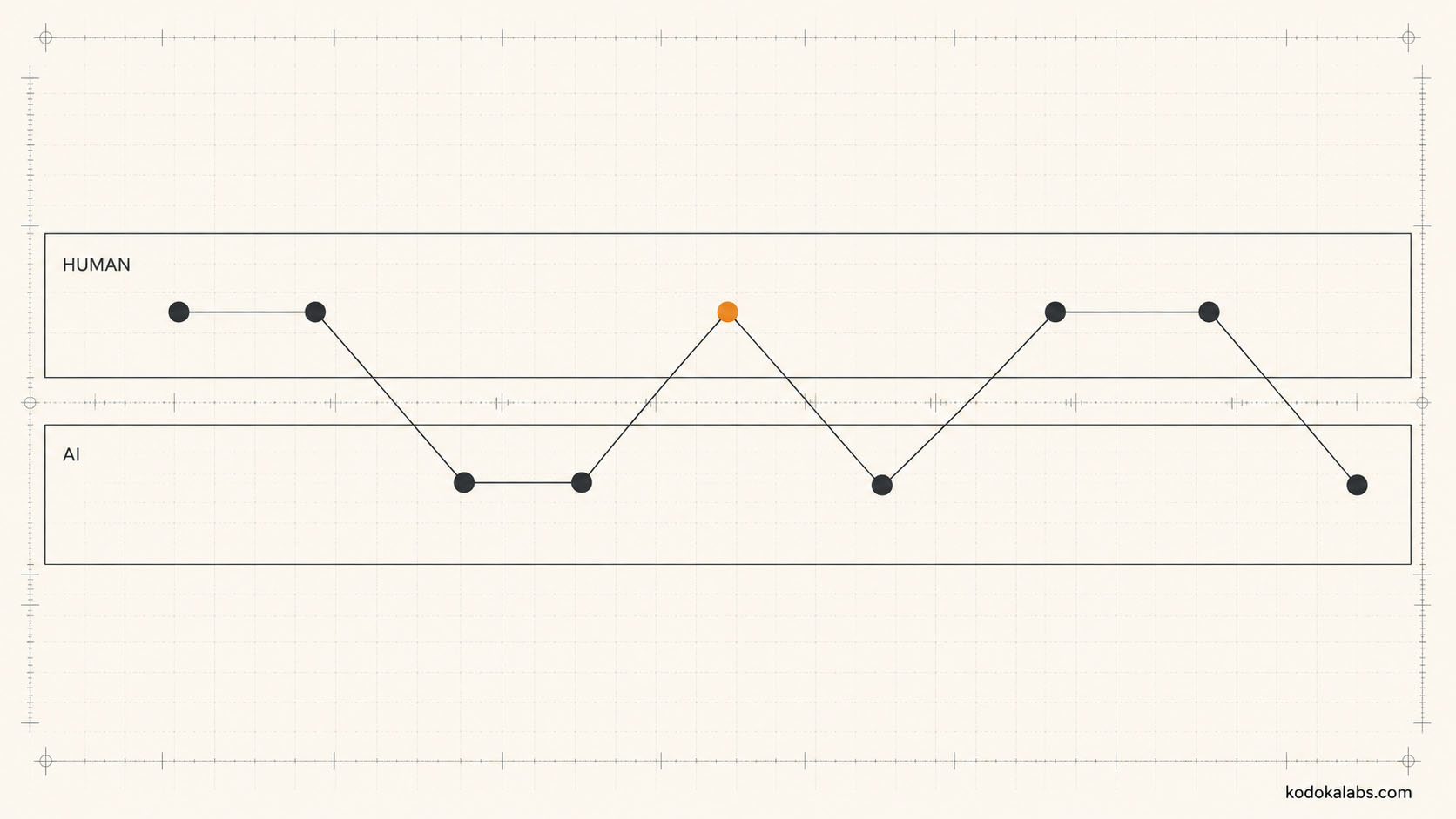
- Human and AI responsibility should be allocated using an explicit test – ambiguity, consequence, reversibility, and more – not by default or convenience.
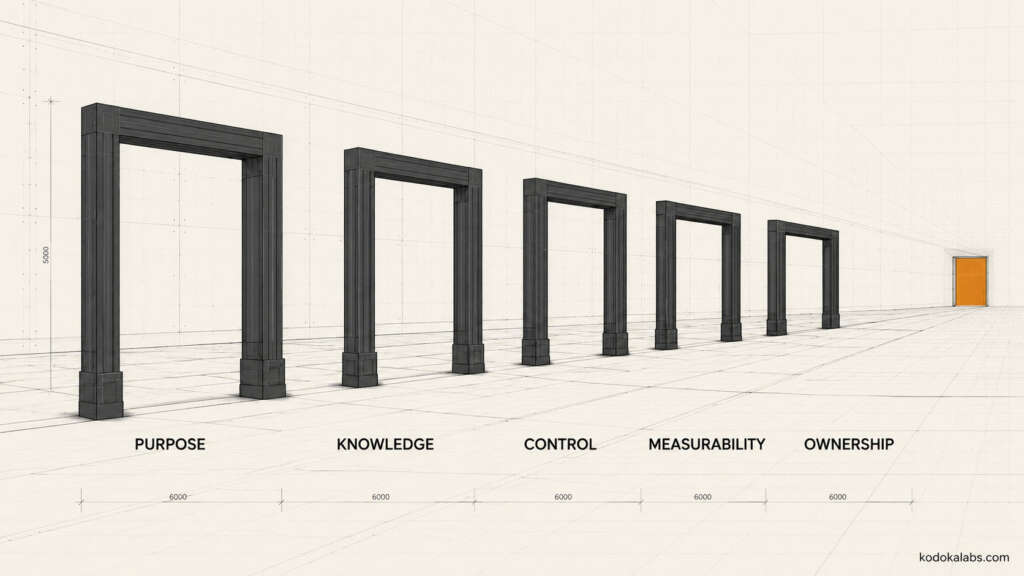
- A workflow shouldn’t enter a pilot until it clears five readiness gates: purpose, knowledge, control, measurability, and ownership.
What Is AI Marketing Workflow Design?
AI marketing workflow design specifies, before any automation is built, how a defined marketing outcome actually gets produced: who’s involved, what knowledge and data they draw on, which AI systems participate and where, what approvals are required, what happens when something goes wrong, and how success is measured. It’s distinct from a prompt – a single instruction to a model – an automation recipe – a sequence of triggered actions – a task list – items to complete without specifying how they connect – and a vendor configuration – settings within a specific tool. Each of those can be a component inside a well-designed workflow. None of them is a substitute for having designed one.
The distinction matters because these four things fail in different, easily confused ways. A prompt fails by producing a poor single output – the fix is usually a better prompt. A workflow fails by producing inconsistent results across different people running it, by losing accountability when something goes wrong, or by working during a demonstration and breaking down under real volume – and no amount of prompt refinement fixes those problems, because they live at a different level of the system. Teams that treat workflow design as “write better prompts, but for the whole process” tend to end up with a longer, more elaborate prompt rather than an actual workflow – the underlying gaps in ownership, control, and exception handling remain exactly where they were.
Task vs. Process vs. Workflow vs. Operating System
Level
Scope
Example
Task
Workflow
Operating system
A task-level fix – a better prompt – cannot solve a workflow-level problem – unclear ownership of the approval decision. Diagnosing which level a problem actually lives at is often the highest-leverage step in the whole exercise.
Organizations tend to make the mistake in one of two directions. The first is treating a workflow-level problem as a task-level one – assuming that faster or better AI-assisted drafting will fix a bottleneck that’s actually caused by an unclear approval chain three steps downstream. Speeding up drafting in that situation doesn’t relieve the bottleneck; it just means more finished drafts pile up waiting for the same slow approval. The second is treating a workflow-level problem as an operating-system-level one – launching a full organizational redesign to fix what’s actually a single broken handoff between two teams. That kind of overcorrection consumes far more time, budget, and organizational goodwill than the problem warranted, and it risks disrupting workflows that were functioning perfectly well. Correctly scoping the problem first is what makes the rest of this guide’s twelve-field canvas efficient to apply rather than a heavyweight exercise run on every minor process tweak.
Why Tool-First Automation Fails
Selecting an AI tool before the workflow around it is designed tends to produce a familiar pattern: the tool accelerates the specific task it was purchased for while the process surrounding that task – the inputs it needs, the review it requires, the exceptions it will encounter, the way its output connects to the next step – remains undefined. The result is often faster production of a single component paired with more rework, inconsistent quality, unclear accountability when something goes wrong, knowledge that lives only in one person’s head, and risk that nobody is actively managing because no one owns it. Tool-first automation optimizes locally and, without workflow design around it, frequently creates cost elsewhere in the system that the initial tool purchase never accounted for.
This pattern is easy to miss internally because the local win is genuinely real and visible – drafting time for a specific asset type really does drop, and that’s the number that gets reported upward. What’s harder to see, because it’s distributed across several people’s time rather than concentrated in one line item, is the downstream cost: an editor who now spends more time correcting AI-generated drafts than they previously spent writing from scratch, a legal reviewer encountering AI-drafted claims they’re unfamiliar with and unsure how to verify, or a brand team discovering months later that inconsistent AI output has quietly diluted brand voice across dozens of assets. None of that shows up in the tool’s own usage dashboard, which is exactly why relying on vendor-reported productivity metrics as evidence of success is unreliable without independently measuring the workflow’s actual end-to-end performance, including the review and correction work the tool’s own metrics don’t capture.
The Workflow Architecture Canvas
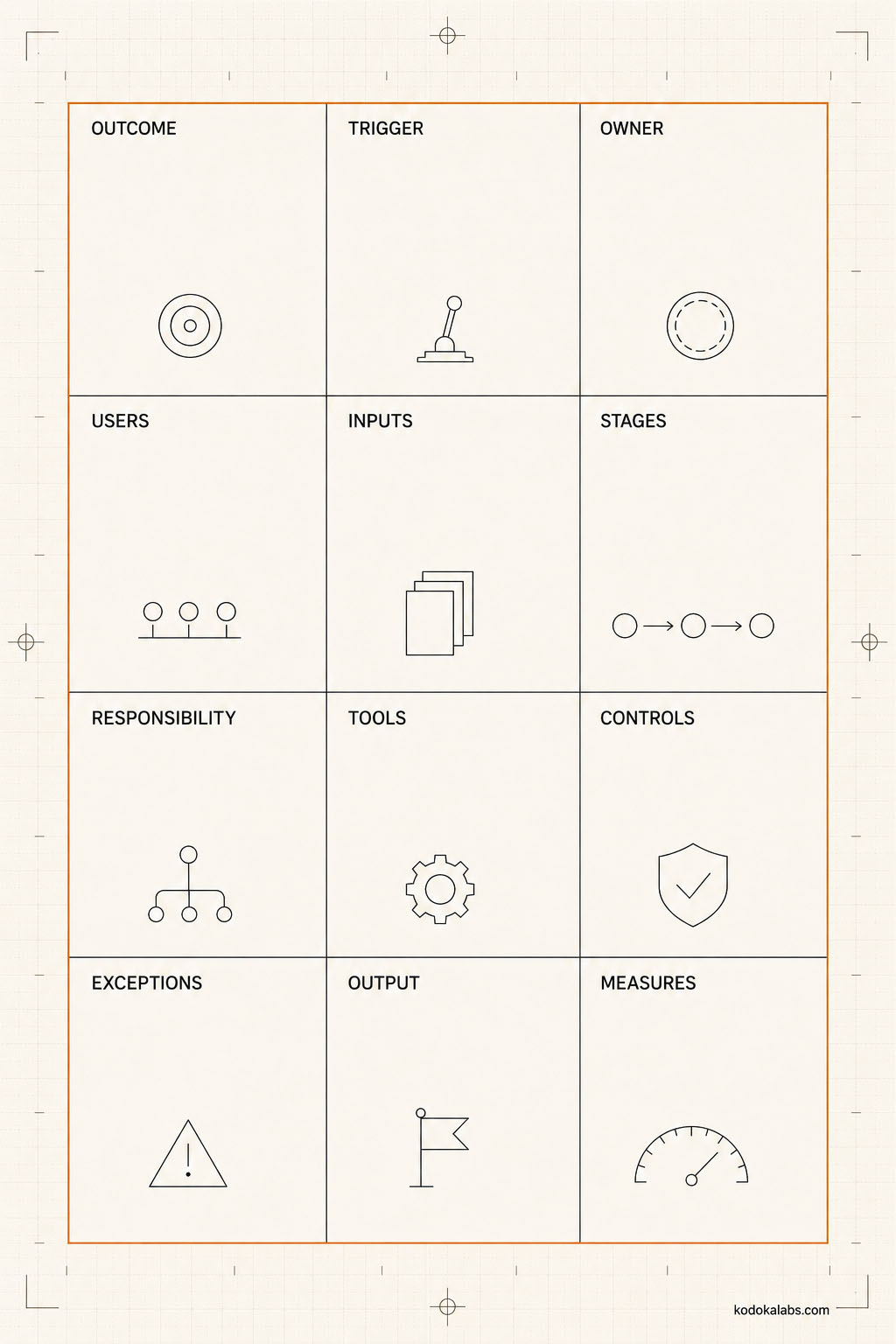
kōdōkalabs’ Workflow Architecture Canvas specifies twelve fields that together define a complete, designed workflow – this is a kōdōkalabs operating model, not an external standard.
#
Field
What It Specifies
1
The specific result the workflow exists to produce
2
3
4
5
6
7
8
9
10
11
12
Business outcome and trigger
Owners, users, and affected stakeholders
Inputs, knowledge, and systems of record
Stages, handoffs, and decision rights
Controls, exceptions, and escalation
Outputs, acceptance criteria, and measurement
How to Map the Current-State Workflow
Before designing a future-state workflow, it’s worth mapping how work actually happens today – not how a process document says it happens, but the real sequence, including the informal workarounds, the steps that exist only in one person’s habits, and the points where work currently stalls or gets redone. This current-state map, built by observing or interviewing the people who actually do the work rather than by assumption, surfaces the gaps a redesign needs to address and gives the team a concrete baseline to compare the new design against.
Current-state mapping is also where a surprising amount of hidden institutional knowledge surfaces. The person who’s been running a process manually for two years often knows exactly which inputs are unreliable, which approvers actually read what they’re approving versus rubber-stamping it, and which “edge case” happens often enough that it’s really just an unacknowledged part of the normal path. Skipping this step and designing the future state directly from a process document or a manager’s mental model of how things work tends to produce a workflow that’s elegant on paper and immediately runs into the same friction points the previous process had – because the design never accounted for the reasons those friction points existed in the first place.
How to Design the Future-State Workflow
How to Allocate Work Between Humans and AI
Category
Human-Led
AI-Assisted
AI-Executed Under Supervision
Strategic positioning
Blog and guide drafting
Routine performance reporting
Ad copy variations
Customer-facing sensitive communication
Internal documentation
Social listening triage
How to Design Human Approval Gates
An approval gate is only meaningful when the person approving has the context, evidence, authority, and time to actually evaluate what they’re approving – a gate that exists on paper but functions as a rubber stamp isn’t a control, it’s a bottleneck without the corresponding safety benefit. Designing a gate well means specifying exactly what the approver is checking, what evidence they need in front of them to check it, what they’re authorized to do (approve, reject, request revision, escalate), and how long they realistically need to do it properly.
A common design mistake is asking one approver to check everything at once – factual accuracy, brand voice, legal risk, and strategic fit – in a single undifferentiated review step. That combination tends to produce reviews that are thorough on whichever dimension the reviewer personally cares most about and superficial on the rest, simply because no one person reliably holds deep expertise across all of them. Splitting approval into distinct gates, each checking a specific, bounded set of criteria against a reviewer actually qualified to assess them, produces a more reliable overall result than a single generalist gate – even though it adds a coordination step. The number of gates a given workflow needs should scale with its risk and complexity, not be fixed at one for every workflow regardless of stakes.
How to Design for Failure and Exceptions
Workflow Readiness Gates
Gate
What It Confirms
Purpose
Knowledge
Control
Measurability
Ownership
From Workflow Design to Pilot
A workflow that clears all five readiness gates is ready to move into Pilot Review – kōdōkalabs’ method for testing a limited-scope workflow against realistic conditions, including edge and failure cases, before wider deployment. Workflow design and pilot testing are deliberately separate steps: design establishes what should happen; the pilot establishes whether it actually does, under real conditions.
Common Failure Modes
- Tool selection before workflow design – choosing an AI tool and then reverse-engineering a workflow around its capabilities.
- Undefined ownership – a workflow that several people touch but no one is actually accountable for.
- Happy-path-only design – no plan for exceptions, so failures get handled inconsistently and undocumented.
- Missing measurement – a workflow that produces output with no defined way to evaluate whether that output is any good.
- Default AI allocation – assigning a task to AI because it’s technically possible, without assessing ambiguity, consequence, or reversibility.
- Approval gates without authority – a reviewer asked to approve something they lack the context or authority to meaningfully evaluate.
- Skipping the current-state map – designing a future state without understanding why the current state actually behaves the way it does.
AI Marketing Workflow Design Checklist
Frequently Asked Questions
01 How should a marketing workflow be designed before AI or automation is added?
02 Why should workflow design precede tool selection?
03 What is the difference between a task, a process, a workflow, and an operating system?
04 Which steps should remain human-owned?
Steps with high ambiguity, high consequence, low reversibility, sensitive data, heavy context dependence, or a need for explainability - assessed using the Human–AI Task Allocation Test rather than decided by default.
05 How should exceptions and failures be designed?
06 What documentation is required before automation?
07 How should workflow value and quality be measured?
Through measures defined during the design phase itself, tied to the workflow's stated business outcome - not added as an afterthought once the workflow is already running.